Case Type Fields
This section covers the fields contained in the Case Type Details panel.
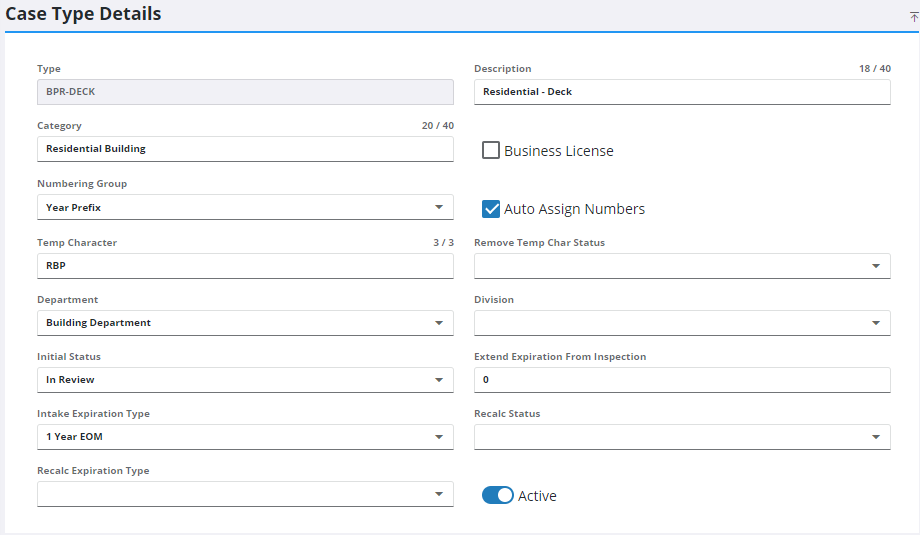
- Type: A code that appears on lists and drop-down boxes. This code is limited to 10 characters and cannot be changed.
- Description: A more specific explanation of the type’s purpose. This field is limited to 40 characters.
- Category: This is an optional organizational tool. If a category label is entered, it appears on the Case Type panel and allows users to sort case types by category.
- Business License: If selected, this check box indicates the case type is for a business license.
- Numbering Group: The numbering format used for ID numbers assigned to cases based on this case type. Use the drop-down list to select the appropriate numbering group.
- Auto Assign Numbers: Generates sequential case numbers. If this check box is not selected, the user must enter a case number manually.
- Temp Character: Assigns a temporary identifying character to the beginning of the case number.
- Remove Temp Char Status: Once the case reaches the status selected here, the temporary character is removed from the case number. Use the drop-down list to select the appropriate status.
- Department: This field allows administrators to specify which department cases are assigned to. Use the drop-down list to select the appropriate department.
- Division: This is a 10-character identifier created by the administrator. Use the drop-down list to view the division codes available.
- Initial Status: This field specifies which status is assigned to the case when it is created. Select the status code from the drop-down list.
- Extend Expiration From Inspection: Automatically extends the expiration date for the inspection. Enter the number of days to extend the expiration date.
- Intake Expiration Type: This field identifies the time frame during which the case is active. Use the drop-down list to select the appropriate expiration type.
- Recalc Status: This field specifies which status code causes the expiration date to be recalculated. Select a status code from the drop-down list.
- Recalc Expiration Type: This field specifies the grace period allowed after the expiration date before the case is officially closed or expired. Select the code from the drop-down list.
- Active: This check box allows administrators to deactivate the case type. Deactivated case types are no longer in use and are not available in drop-down lists or selection windows. This does not affect existing cases based on the deactivated case type.