Configure Email Settings
|
|
 Steps for Admin 3.0-3.10
Emails can be set up to send internal emails to designated employees or external emails to citizens or contractors in Preferences. Emails can be sent at certain times, such as when a service request or work order is created or closed, when plans for a new building are approved, or when a Submit To or Dispatch To field is changed. Once email preferences are defined, the administrator must also configure the email templates and events under Email and under the Notifications Menu in PLL Admin. See Add or Edit an Email Template and Add or Edit an Email Event for more information.
 NOTE: These Email settings are also used for password recovery. When a user forgets their password, they are sent an email to reset their password. If the user belongs to multiple domains, the default domain's Email settings is used.
- From the home page, click Admin and click Preferences.
- Click the AMS tab.
- Expand the Email section on the Domain panel.
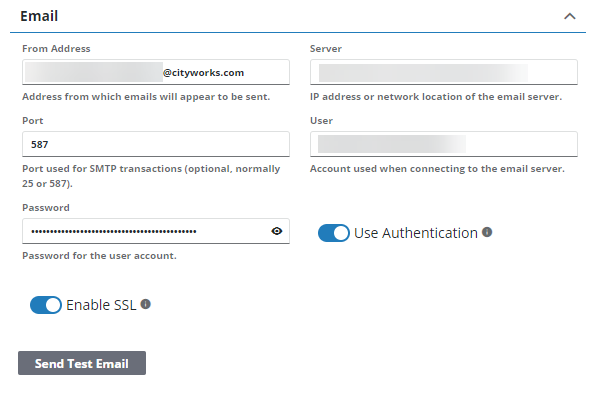
- Enter the email address from which the email appears to be sent in the From Address field. Verify that this email corresponds to the email actually set up in Microsoft.
Emails sent by Cityworks appear in the Sent folder of the mailbox associated with the configured From Address.
 IMPORTANT: For Cityworks Online clients, if Trimble hosts your email server, do not update the From Address because it can cause issues with emails being sent or received.
- Enter the IP address of network location of the email server in the Server field.
- The existing Port number for the SMTP connection can remain. Otherwise, enter 1 if this is the first time setting up email settings.
- Enter the account used when connecting to the email server in the User field. This field may be left empty.
- Enter the Password for the User account. This field may be left empty.
- Use Authentication should be turned on.
- Select Enable SSL to use SSL (Secure Sockets Layer) to encrypt the connection.
To ensure that your email settings are working, you can send a test email. See Test Email Settings for more information.
Steps for Admin 3.11-3.12
Emails can be set up to send internal emails to designated employees or external emails to citizens or contractors in Preferences. Emails can be sent at certain times, such as when a service request or work order is created or closed, when plans for a new building are approved, or when a Submit To or Dispatch To field is changed. Once email preferences are defined, the administrator must also configure the email templates and events under Email and under the Notifications Menu in PLL Admin. See Add or Edit an Email Template and Add or Edit an Email Event for more information.
NOTE: These Email settings are also used for password recovery. When a user forgets their password, they are sent an email to reset their password. If the user belongs to multiple domains, the default domain's Email settings is used.
- From the home page, click Admin and click Preferences.
- Click the AMS tab.
- Expand the Email section on the Domain panel.
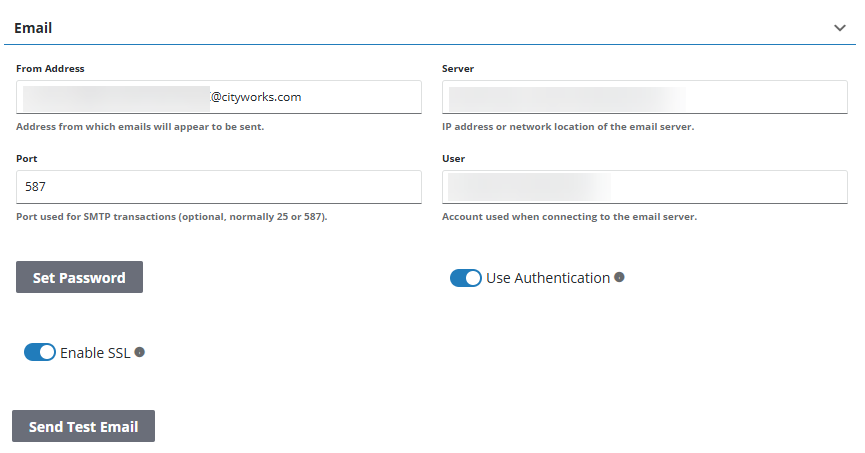
- Enter the email address from which the email appears to be sent in the From Address field. Verify that this email corresponds to the email actually set up in Microsoft.
Emails sent by Cityworks appear in the Sent folder of the mailbox associated with the configured From Address.
IMPORTANT: For Cityworks Online clients, if Trimble hosts your email server, do not update the From Address because it can cause issues with emails being sent or received.
- Enter the IP address of network location of the email server in the Server field.
- The existing Port number for the SMTP connection can remain. Otherwise, enter 1 if this is the first time setting up email settings.
NOTE: The User and Password are not required. The email client is configured in Oauth 2 Clients instead. See Create the Microsoft Azure Client for more information.
- Use Authentication should be turned on.
- Select Enable SSL to use SSL (Secure Sockets Layer) to encrypt the connection.
To ensure that your email settings are working, you can send a test email. See Test Email Settings for more information.
NOTE: Admin automatically saves the changes you make. A notification pops up at the bottom to verify changes have been saved.