Expiration Types Fields
This section covers all the fields contained in the Add: Expiration Type and Edit: Expiration Type panels.
 NOTE: The Edit: Expiration Type panel contains all the items displayed on the Add: Expiration Type panel as well as a few additional items. Therefore, only the Edit: Expiration Type panel is displayed and explained here.
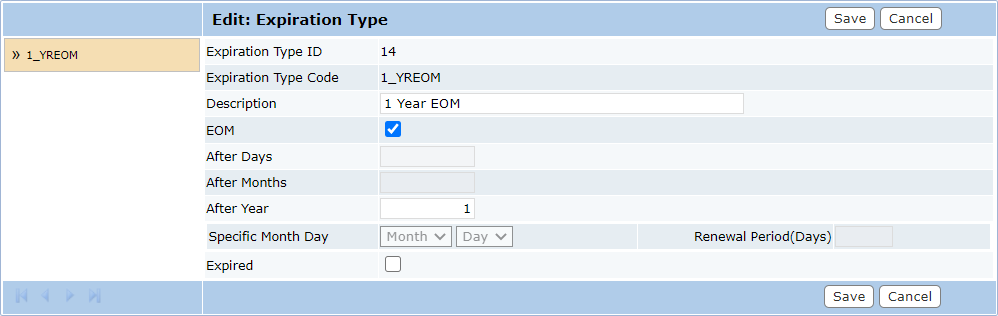
- Expiration Type ID: This is a numerical identifier used to locate specific expiration types. It is assigned automatically after the expiration type has been saved. This field cannot be changed.
- Expiration Type Code: This is an identifying code that appears on lists and drop-down boxes. The code is limited to 10 characters. This field cannot be changed.
- Description: This is a more specific explanation of the type.
- EOM: This stands for End of Month. Select this check box to indicate that the expiration will occur at the end of the month, regardless of which day of the month the exact time limit expires.
- After Days: This is the number of days after which the expiration will go into effect. This is often the simplest way to handle short-term expirations.
- After Months: This is the number of months after which the expiration will go into effect. This is often the simplest way to handle short-term expirations.
- After Years: This is the number of years after which the expiration will go into effect. This is often the simplest way to handle short-term expirations.
- Specific Month Day: These fields allow administrators to select a specific date when all items will expire. Use the Month and Day drop-down list to select the date.
- Renewal Period (Days): This field allows administrators to control how many days before the expiration date an item may be renewed. Enter a numerical value in the box representing the number of days in the renewal period.
- Expired: This check box, available only on the Edit Expiration Type panel, allows administrators to mark the expiration type as expired. Expired expiration types are not available for use on new case types or templates. This does not affect existing cases using the expired expiration type.