Case Notification Fields
This section covers all the fields contained in the Add:Notification Case and Edit:Notification Case panels.
 NOTE: The Edit:Notification Case panel contains all the items displayed on the Add:Notification Case panel as well as a few additional items. Therefore, only the Edit:Notification Case panel is displayed and explained here.
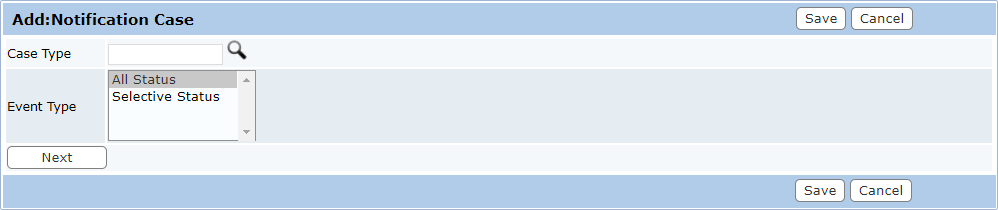
- Case Type: This field identifies the kind of case the notification will be applied to. Click Lookup to display a list of existing case types. Select the option button to the left of the desired case type and click Submit. This field cannot be changed once the case notification has been saved.
- Event Type: Event types define when a notification will be sent. Administrators must select one of three options and click Next before the notification can be completed. This field cannot be changed once the case notification has been saved.
 All Status
This option will send notifications whenever a case’s status is changed. This is the simplest Event Type and requires no further information. This option will proceed directly to the final setup phase, the People and Contractors phase.
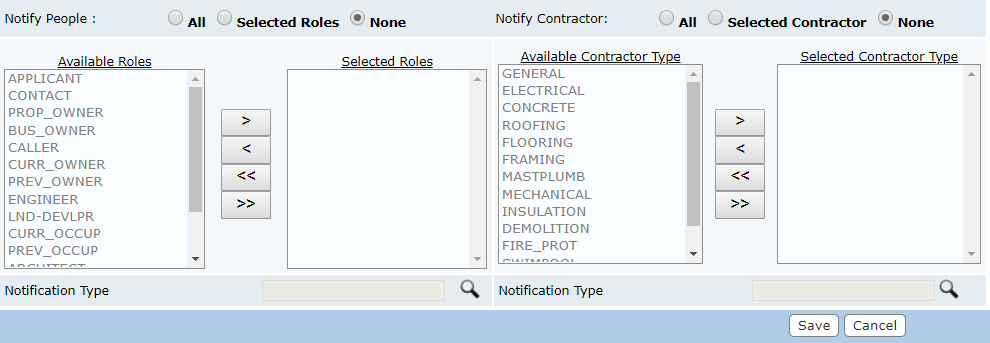
The final step is to select what kind of notification will be sent. Click Lookup next to the Notification Type field to open a selection window displaying all available notification types. Select the desired notification type(s), and click Submit
Selective Status
This option will only send notification when a specific status is assigned to the case. This option requires the administrator to select a case status before proceeding to the last phase of setup.

Select Case Status and click Next: Choose a case status from the drop-down list and click Next.
The final step is to select what kind of notification will be sent. Click Lookup next to the Notification Type field to open a selection window displaying all available notification types. Select the desired notification type(s), and click Submit.

