Contractor Record Fields
This section covers all the fields contained in the Add: Contractor and Edit: Contractor panels.
 NOTE: The Edit: Contractor panel contains all the items displayed on the Add: Contractor panel as well as a few additional items. Therefore, only the Edit: Contractor panel is displayed and explained here.
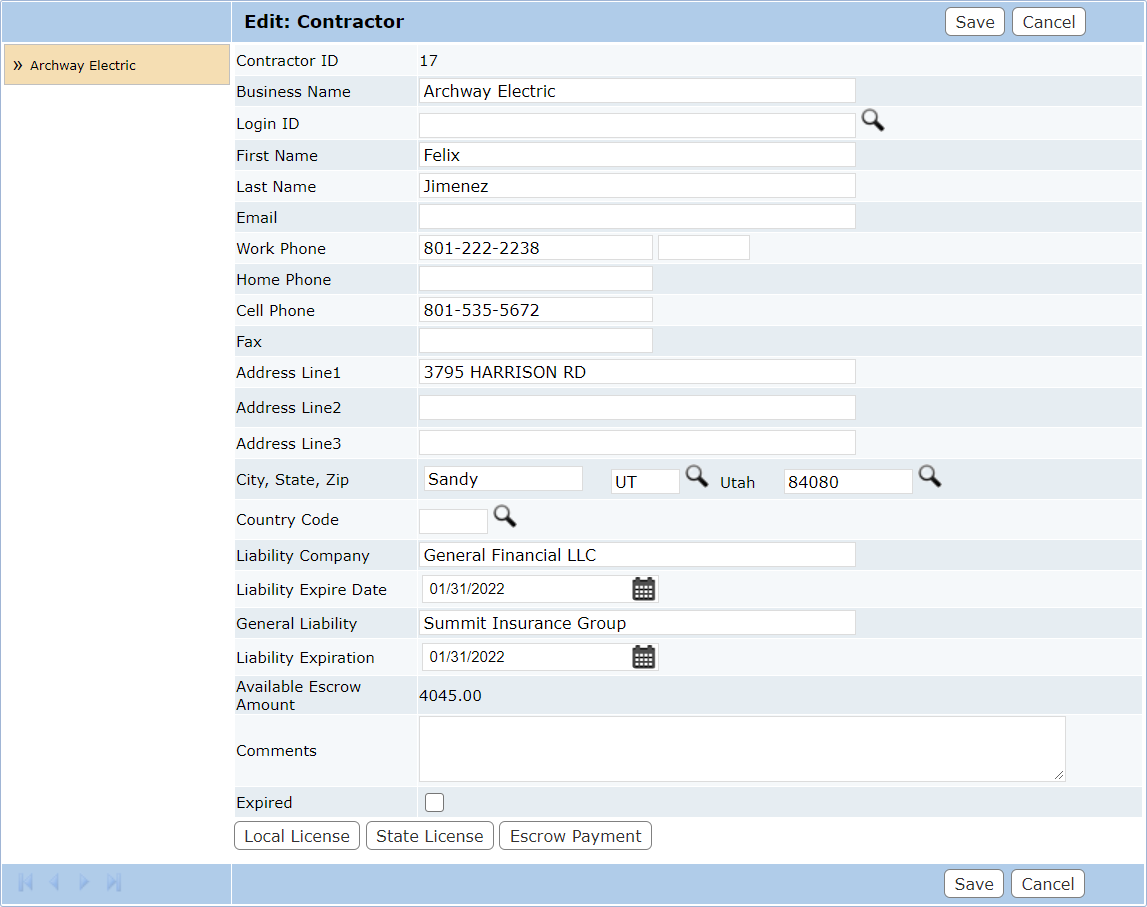
- Contractor ID: This is an identifier automatically assigned by the software to help track the contractor. This field cannot be changed.
- Business Name: Enter the official name of the contractor. This field cannot be changed once the contractor has been saved.
- Login ID: This field is for the login ID of the user creating the contractor. To pick a login ID, click Lookup to the right of this field.
- Company Information: The contact information of the company and/or owner or contact person (including name, address, phone and fax numbers, and email address) may be entered here.
- Liability Company: This is the name of the company that provides worker’s compensation for the contractor in the event of an accident on the job.
- Liability Expire Date: Click the calendar icon to select the expiration date of the contractor's coverage.
- General Liability: This field is for the name of the insurance agency covering liabilities other than worker’s compensation.
- Liability Expiration: Click the calendar icon to select the expiration date of the contractor's coverage.
- Available Escrow Amount: This field shows the current balance in the contractor's escrow account, if applicable.
- Comments: Enter any comments or notes relative to the contractor here.
- Local License: This button, visible only on the Edit: Contractor panel, allows administrators to add and update a contractor’s local and state licenses.
- State License: This button, visible only on the Edit: Contractor panel, allows administrators to track the status of a contractor’s state license(s).

