Deposit Fields
This section covers all the fields contained in the Add: Deposit and Edit: Deposit panels.
 NOTE: The Edit: Deposit panel contains all the items displayed on the Add: Deposit panel as well as a few additional items. Therefore, only the Edit: Deposit panel is displayed and explained here.
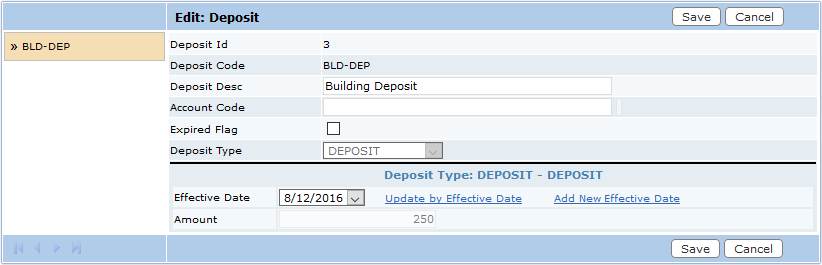
- Deposit ID: This identifier is created automatically when the deposit is saved.
- Deposit Code: Enter a 10-character code that will appear on drop-down lists.
- Deposit Desc: Enter a detailed description of the deposit, for example the case template it will apply to or the fees it will cover.
- Account Code: Optional, the account into which the deposit will be paid.
- Deposit Type: Select a deposit type from the drop-down list.
- DEPOSIT: The amount of the deposit.
- PERDEPOSIT: The percentage used to calculate the deposit amount.
- Effective Date: Use the calendar tool to select a date on which the deposit will go into effect.
- Amount: Enter the desired amount for the deposit.

