Numbering Group Fields
This section covers all the fields contained in the Add: Numbering Group and Edit: Numbering Group panels.
 NOTE: The Edit: Numbering Group panel contains all the items displayed on the Add: Numbering Group panel as well as a few additional items. Therefore, only the Edit: Numbering Group panel is displayed and explained here.
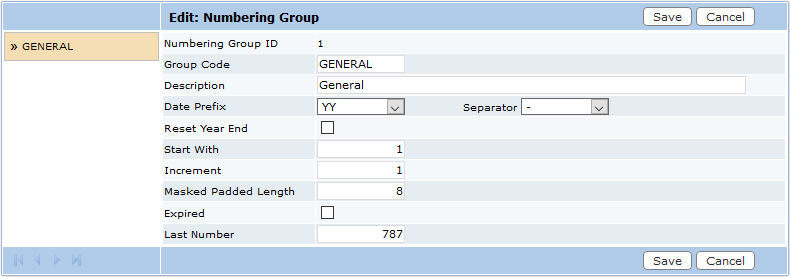
- Numbering Group ID: A numerical identifier used to track specific numbering groups. It will be assigned automatically after the numbering group has been saved. This field cannot be edited.
- Group Code: An identifying code that appears on lists and drop-down boxes. This code is limited to 10 characters.
- Description: This is a more specific explanation of the group’s parameters.
- Date Prefix: Provides several different format options for displaying dates associated with a case.
- Separator: Allows administrators to select which character they want to use to separate the elements of the date.
- Reset Year End: Select this check box to reset the group at the end of every year.
- Start With: Enter the number you want to start the numbering group with.
- Increment By: This field sets the increment of the automatic numbering system; this allows administrators some flexibility in numbering cases. If a child case is created, it will automatically be assigned the next number in the sequence.
- Masked Padded Length: This field sets the number of digits in the IDs. Administrators should base this value on the estimated number of cases they expect to have in a year.
- Expired: Indicates the numbering group is no longer available when creating case templates. Existing cases using this numbering group will not be affected.
- Last Number: This field displays the number of the last permit to use this number group.

