Work Order Functions
The drop-down arrow to the right of Work Order Edit provides the user with more functionality within the work order.
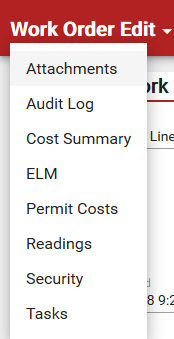
- Attachments: Attach images, documents, or files related to the work order.
- Audit Log: View an audit log, which tracks all edits made to the work order.
- Cost Summary: View the work order cost summary.
- ELM: Quickly add labor, material, or equipment to the work order. ELM is for users who use crews.
- Permit Costs: View and edit simple permits and their costs.
- Readings: Manually update the asset reading on the work order. Assets must be configured for readings in Designer.
- Security: View and edit work order security (only available to administrators).
- Tasks: View, edit, or add any tasks.