Address Fields
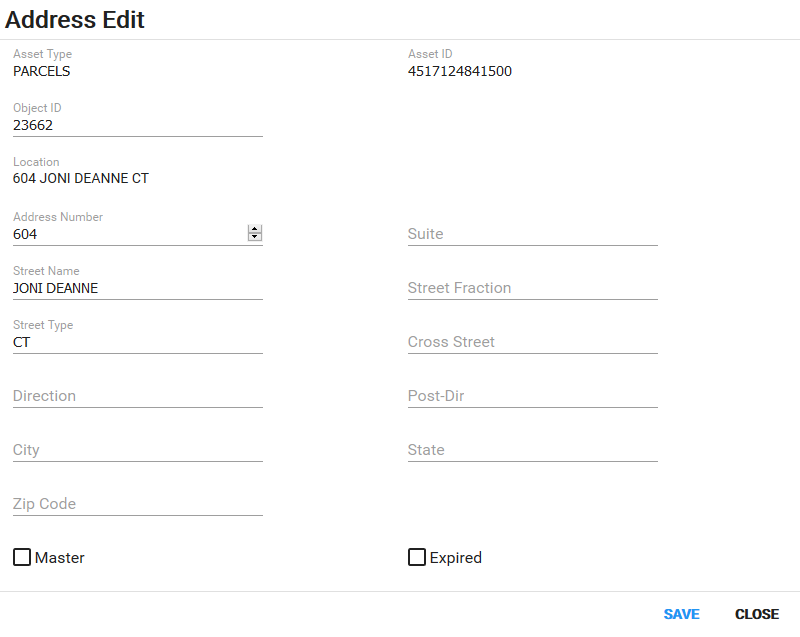
- Asset Type: This is the type of asset the permit is attached to, such as a parcel or structure.
- Asset Id: This is a numeric identifier assigned to this specific asset.
- Object ID: The numeric identifier assigned to a piece of land in the geodatabase.
- Location: This is the primary address for the case.
- Address Number: The number of the building, lot, residence, etc.
- Suite: The number of the unit (such as an office or apartment) within a larger building or complex.
- Street Name: This is the name of the street.
- Street Fraction: The numerical identifier of a street or alley which is not separately addressed.
- Street Type: This is the kind of street, such as road, circle, avenue, boulevard, and so on.
- Cross Street: The name of the nearest intersecting street.
- Direction: The directional prefix of the street (for example, N, NW, W, etc.).
- Post-Dir: The directional suffix of the street (for example, S, SE, E, etc.).
- City: Enter the city name.
- State: Enter the state postal code.
- Zip: Enter the zip code. If the zip code in question has already been added to the database, selecting it automatically adds the city name.
- Master: Select the check box to designate this address as the primary address for the case.
- Expired: Select the check box to designate this address as expired.