Receive Material from a Work Order
If material was issued to a work order and wasn't used, you can receive it back in Storeroom to keep an accurate account of material costs for the work order. Alternatively, you can delete the material from the work order. See
- Click Receive on the Storeroom toolbar.
- Select the work order icon on the Material panel.
- Enter the work order id, or click the binoculars icon to search for a work order.
- Select the Status from the drop-down list. Multiple statuses can be selected.
- Select an employee from the Submit To drop-down list. Multiple employees may be selected.
 TIP: Click the X next to a status or employee to remove it from the search criteria, or press Delete on your keyboard.
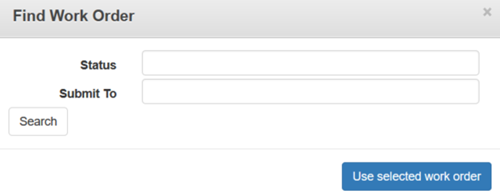
- Click Search.
- Work orders matching the search criteria will appear below Search.

- Select a work order and click Use selected work order. This will enter the Work Order Id into the field.
The materials issued to the work order appear in the list.
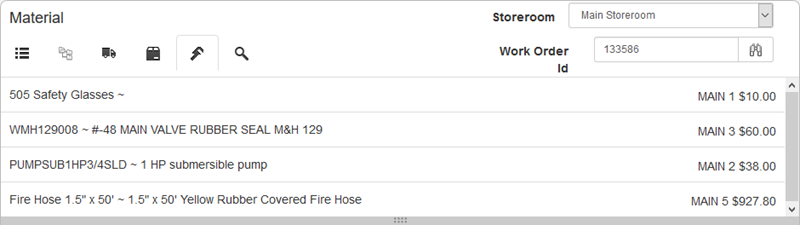
- Select materials from the list.
TIP: To select multiple materials use <Shift + click> or <Ctrl + click>.
- Enter the information in the Receive Material panel below the material list to receive the material, including the Quantity, which is required to receive material. The Unit Cost is already populated with cost entered when it was issued to the work order, and cannot be changed.
For an explanation of the fields found on the Receive Material panel, see Receive Transaction Fields.
- Click Add to List to add the materials to the Material to Receive section.
- If you would like to add other materials to this receive transaction, click Clear to clear the fields and add another material to the list.
- To remove one of the records from the Material to Receive list, select the record and click Remove.
- Click Commit to process all received materials listed. Clicking Commit adjusts the stock on hand for the storerooms selected and adjusts the material cost on the work order.

Documentation Feedback Form
Please give us feedback about this Cityworks guide.
If you have a feature enhancement request, please see the Ideas page on MyCityworks.
Last updated 1/3/2020.
Copyright© 2014–2019 by Azteca Systems, LLC. All rights reserved.