Configure Bin Locations and Images for Materials
The Bin and 2nd Bin sections include the location of the bin and a corresponding image.
- Click Config on the Storeroom toolbar and click Storeroom Materials.
- Select the storeroom you'd like to add material to.
- Select a material from the Storeroom Materials panel.
- In the Bin or 2nd Bin sections, enter the Location.
- Click Upload and navigate to an image for the bin or drag and drop an image where it says Drag and drop an image here.
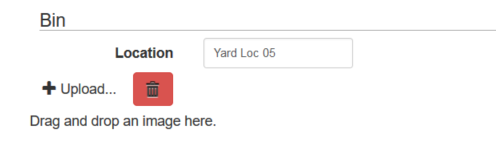
The image will appear next to Upload.
- To delete the image, click the red delete icon.
- To download the image, click the thumbnail.
Documentation Feedback Form
Please give us feedback about this Cityworks guide.
If you have a feature enhancement request, please see the Ideas page on MyCityworks.
Last updated 1/3/2020.
Copyright© 2014–2019 by Azteca Systems, LLC. All rights reserved.