Transfer Ownership of a Dashboard
You can transfer ownership rights of a dashboard from the creator to another user.
|
|
 PREREQUISITES:
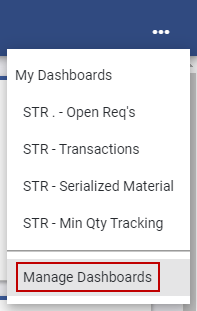
 NOTE: The 10 most-recently-viewed dashboards display. To quickly switch between recently-viewed dashboards, see Switch Between Dashboards for more information.
The Dashboard Management page opens.
 TIP: You can filter the list of records displayed. See Filter Records for more information.
- Select a dashboard from the Dashboards panel.
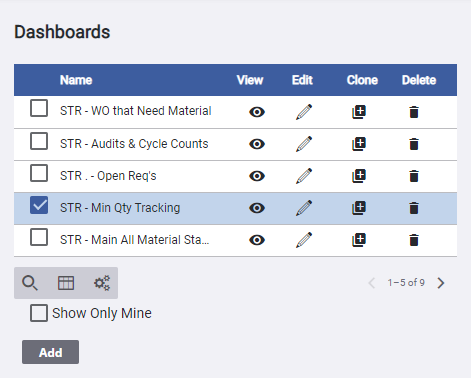
Any users assigned to the dashboard appear in the permissions panel.
NOTE: The current Owner is identified in the upper-right corner.
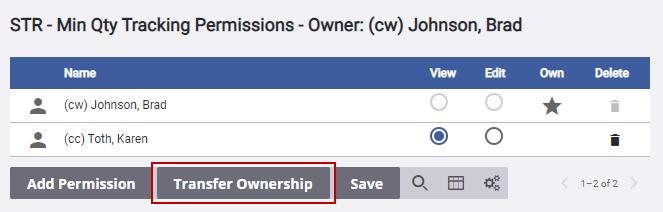
NOTE: If the person you transfer ownership to is not in the permissions panel, they are added when ownership is transferred to them.
- In the New Owner drop-down list, you can either select a user or start typing to filter the list and then select a user.
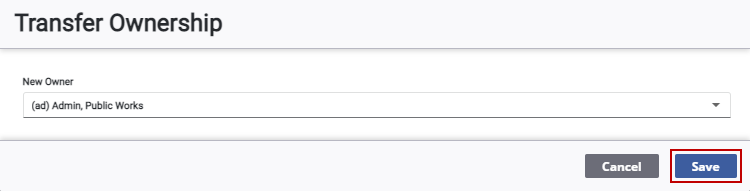
A confirmation message appears and the Owner in the upper-right corner and the Own column change, as well as your permission rights.

