Add an Expiration Type
This section explains how to create a new numbering group.
|
|
 PREREQUISITES:
 Create Numbering Group Using Days, Months, or Years
- From the home page, click PLL and click Expiration Types.
- On the Expiration Types panel, click Add record.
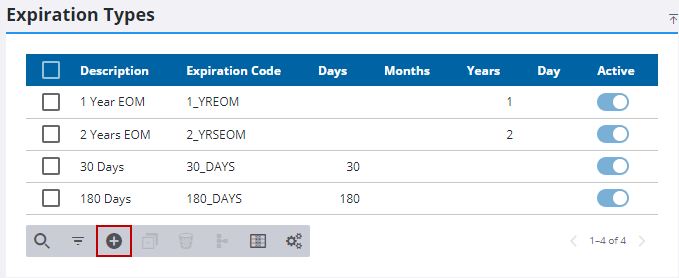
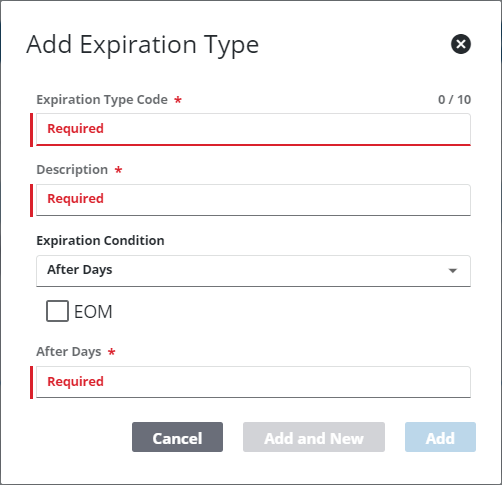
- In the Expiration Type Code field, enter a short (10-character maximum) identifier for the database.
- Enter a brief identifier or explanation of the expiration type in the Description field.
- Use the Expiration Condition drop-down list to define whether the expiration type goes into effect after a certain number days, months, years, or on a specific date.
- Select the EOM (End of Month) check box to indicate that the expiration occurs at the end of the month, regardless of which day of the month the exact time limit expires.
- Select After Days, After Months, or After Years in the Expiration Condition field and enter the number of days, months, or years after which the expiration type activates.
- Click Add to create the expiration type, or click Add and New to create another expiration type.
Create Numbering Groups with Specific Date
- From the home page, click PLL and click Expiration Types.
- On the Expiration Types panel, click Add record.
- In the Expiration Type Code field, enter a short (10-character maximum) identifier for the database.
- Enter a brief identifier or explanation of the expiration type in the Description field.
- Use the Expiration Condition drop-down list to define whether the expiration type goes into effect after a certain number days, months, years, or on a specific date.
- Select the EOM (End of Month) check box to indicate that the expiration occurs at the end of the month, regardless of which day of the month the exact time limit expires.
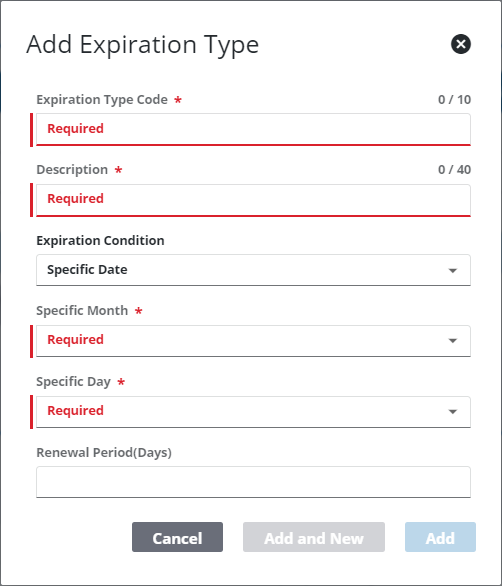
- Select Specific Date on the Expiration Condition field and use the drop-down lists to select a month and a day of the month. Then enter a number in the Renewal Period(Days) field.
- Click Add to create the expiration type, or click Add and New to create another expiration type.
 NOTE: The Review Config panel provides visibility of where a selected data item (such as a case type, PLL user, status code, or other PLL item) is being used. See Review PLL Configurations for more information.

