Add a Checklist Status Code
This section will discuss how to set up new checklist status codes.
|
PREREQUISITES:
|
To add a new checklist status code, also known as a correction or correction status code, follow these simple steps:
- Open PLL Admin.
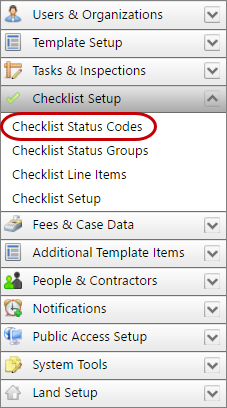
- On the PLL Admin page, click Checklist Setup on the PLL Admin menu panel and select Checklist Status Codes.
- On the Checklist Status Codes panel, click Add record at the top of the panel.
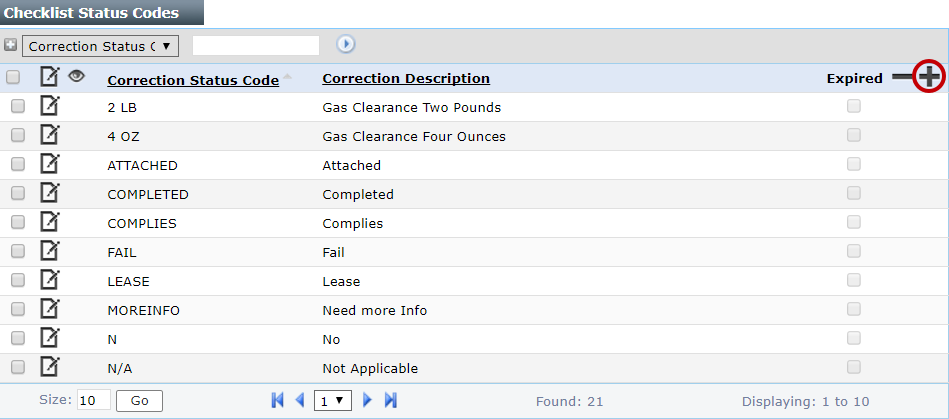
 NOTE: Search or filter the records on this panel to quickly find the one(s) you want. See Search and Filter Records for more information.
- On the Add: Correction Status panel, enter a 10-chracter (maximum) name in the in the Correction Status Code field and a brief explanation of the status code in the Correction Description field.

- Click Save.

Documentation Feedback Form
Please give us feedback about this Cityworks guide.
If you have a feature enhancement request, please see the Ideas page on MyCityworks.
Last updated 2/4/2020.
Copyright© 2010–2019 by Azteca Systems, LLC. All rights reserved.