Remove Queries From the Mobile Inbox
Administrators can remove queries they own from a user's, group's, or domain's inbox. If a user no longer wants to see a query in their inbox, they must have the owner of the query remove it from their inbox.
|
|
 PREREQUISITES:
 TIP: You can filter the list of records displayed. See Filter Records for more information.
- Select the query you'd like to remove from a mobile inbox. Select Show Only Mine to filter the list based on queries you own or select the Query Type in the upper-left corner.
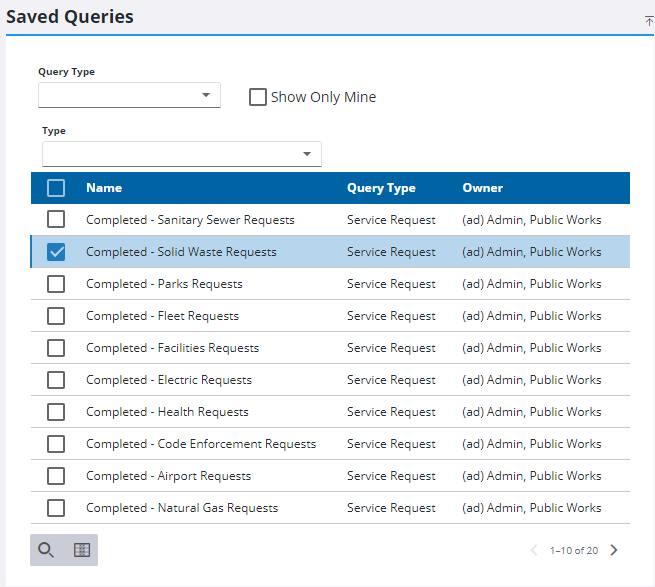
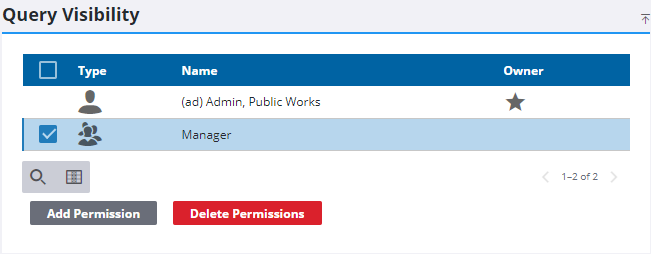
- From the Query Visibility panel, select the user, group, or domain you'd like to remove from the query.
- Click Delete Permissions.
- Click Delete from the Delete Mobile Permissions panel.

 NOTE: Admin automatically saves the changes you make. A notification pops up at the bottom to verify changes have been saved.

