Storeroom Menu
- Expand the menu to perform Storeroom transactions, search transactions, access administrative pages under Config, access the User Menu, and switch between apps.
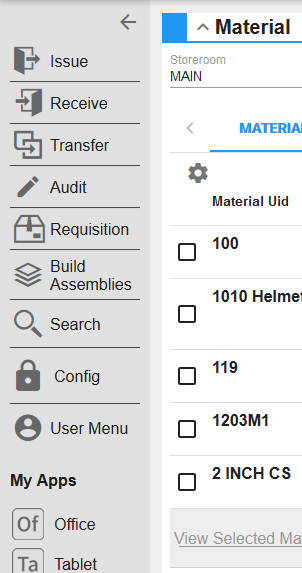
- Issue creates a transaction of materials issued to work orders, accounts, and/or employees.
- Receive adds materials received from suppliers, or returned from work orders, to a storeroom, and adjusts the work order cost when applicable.
- Transfer moves materials from one storeroom to another.
- Audit adjusts quantity and material costs to match current inventory and tracks deficits or surplus materials.
- Requisition creates an order for materials from a supplier that can be sent to purchasing or directly to the supplier.
- Build Assemblies receives assembled materials into the storeroom to be issued.
- Tap Search to search Storeroom transactions.
- Requisition Search searches requisition transactions.
- Transaction Search searches issue, receive, audit, and transfer transactions.
- Config is used to access Storeroom settings such as Material, Storeroom Material, Supplier Material, and Groups.
- Tap User Menu to log out, change Storeroom profiles, change the theme, and switch the menu layout.
- My Apps lists all the apps you're licensed for. Tap an app to switch apps or tap My Apps to see a complete list of apps you can switch to. See Switch Between Apps for more information.
 NOTE: Issue and Receive transactions are written to Storeroom when materials are added or removed from a work order, which updates the stock on hand.
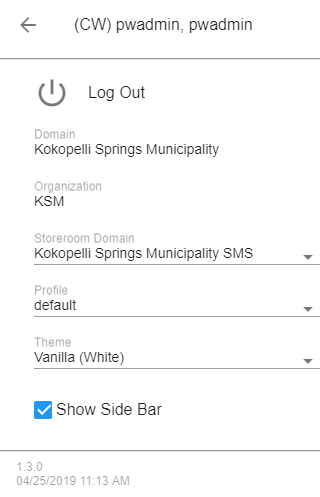
See Change Storeroom Domains, Switch Between Apps, Log Out, View the Domain, Organization, and Storeroom Domain, Switch Customization Profiles, Customize the Color Theme and Switch Menu Layouts for more information.